30/5-23: First draft. Need technical analysis and test design.
31/5-23: Add technical analysis and solution. Draft test design. Need refinement of test design.
Registering expenses:
Continuously tracking expenses can be a tedious task. In reality, no matter how much I’d like to say that I keep a 100% log of all transactions, I also miss noting expenses down from time to time. In order to improve my “hit rate” it is important to make registering expenses as easy as possible. Today the app can only get input through SQL queries or posting one expense at the time using i.e. Postman. Thus the app needs an easy to use form, that makes is simple to register expenses.
By making it easier i mean:
- Being able to register more expenses in a row without leaving the keyboard to add, change field or something else that can break the flow
- Break down the proces of registering and categorising expenses into at least 2 steps. This means being able to register expenses in one session and not having to categorise at the same time. This can then be done in another process. Adding functionality to to this for several expenses is for another Change Request.
- Narrow, non-wide UI, that makes is possible to have the form on one side of the screen while have my bank statements on the other side.
- Show latest created transaction with ID in order to easily identify transactions that needs editing afterwards.
Technical analysis and solution
Current solution has no front end, an API for getting, posting, updating and deleting transactions. The API is connected to a postgres database running locally on my local environment. The main part of the solution will be a form that takes user input. That means we have to work out a simple front end to accomedate this new feature.

The form will communicate with the POST route for /transaction which in turn will insert the data to the database. A succesfull “insert into” will return the new transaction to the UI.
Design
The form take 3 mandatory inputs as well as 2 optional. Besides this, the UI will show recently added transactions. Mandatory fields are date, amount and text. On the optional part we find category and comment (greyed out) Underneath the form, recently added transactions are showed to the user.
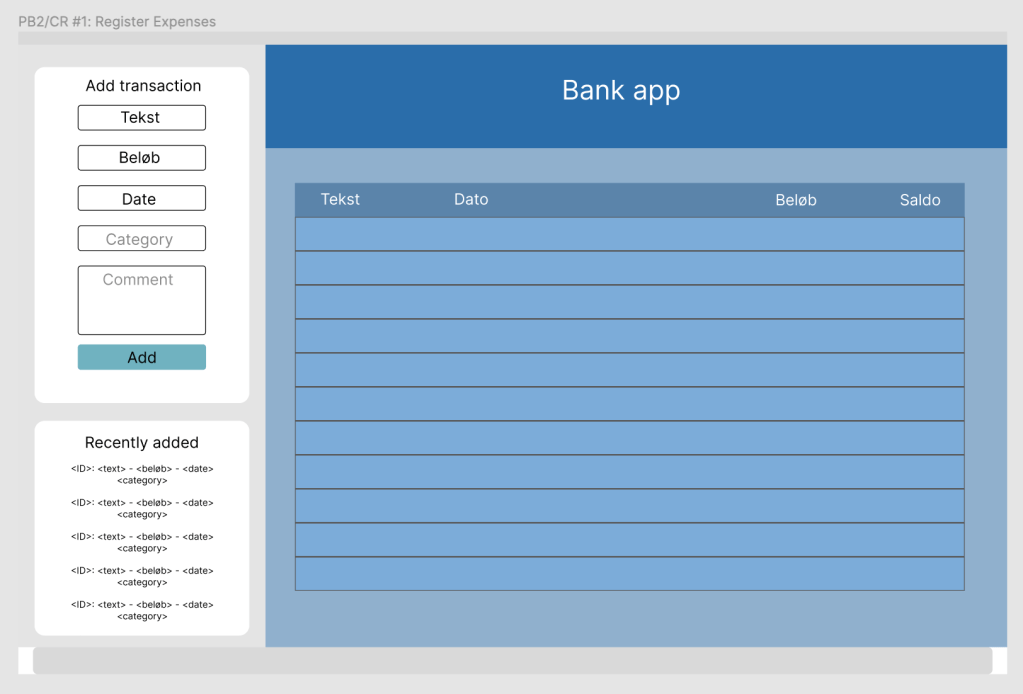
The design fits approximately 1/4 of the screen. This enables the user to have both the ank app and the form visible at the same time. The enables the shortest non-technical interface between the source of data and inputting it into the app.
After successfully adding a Transaction to the DB, newest transactions are shown in the field below the form. Besides text, beløb, date and category
Form validation and field types
The following fields should be validated on the front end:
Mandatory
- Tekst: Varchar. That the field is not empty and not over 50 characters.
- Amount: Float. if it has datatype float (or can be converted from datatype integer). That it is not empty
- Dato: Date. If is a valid date. Format should be DD-MM-YY
If one or more mandatory fields fails the validation, the field should empty and show a red border.
Opional
- Category: Varchar. if filled, the category has to be available in the category table. (Categories cannot be added here but will be possible to add through separate form).
Navigation
A few notes on the navigation of the form:
- Using tab to chose between fields.
- Hitting enter at any point will try to post the input and return a new empty form.
Testing
Has to be further detailed – in short:
- Add valid transaction in the form
- row added in database
- category is known in db already
- form is empty after posting
- added transaction is shown under “recently added”
- transaction without category is categorised as “other”
- Add invalid transaction in the form
- no rows added to database
- correct error message returned from api
 Development of a developer